How to claim your business in ChatGPT (Business Hub guide)
Claim your business in ChatGPT: a step-by-step Business Hub guide with screenshots, what already works in the Netherlands, and what it gets you.
 Maurits DekkerCo-founder, engineering
· 16 min read
In this article
- Short answer
- Key points
- Step-by-step: how to claim your business in ChatGPT
- What to write in "More about your business"
- What works in the Netherlands, and what does not yet
- What exactly is Businesses in ChatGPT?
- Is this the same as ChatGPT Business?
- Who is it worth it for?
- What do the insights show?
- Why the counter is lower than how often you are mentioned
- Frequently asked questions
- Conclusion
- Where we stand
- Sources
Short answer
Since 10 November 2026 you can claim your business in ChatGPT through Business Hub. You prove the business is yours, keep its details up to date and see how often ChatGPT mentions your website. It is free, already works in the Netherlands and works with a free ChatGPT account. Allow fifteen minutes, plus waiting time for the review. OpenAI itself says claiming does not move you up in the answers: it makes sure ChatGPT has the right details about you.
Key points
- You find it in the ChatGPT sidebar under Business. It works much like a Google Business Profile.
- In the Netherlands you can now claim a business, edit its details and view the insights. Not yet available: the Business Agent, shopping with your products, and claiming a physical location (there is a waitlist for that).
- It is not the same as ChatGPT Business, the paid plan for teams.
- The counter in Business Hub only counts the times ChatGPT cites your website. In our measurement of 8,124 ChatGPT answers, the own website of a named business appeared among the sources in only about a third of cases. You are mentioned more often than the counter shows.
Step-by-step: how to claim your business in ChatGPT
We went through the whole process ourselves on 11 November 2026: first for AIGeschikt, then again for Websyte, a second Dutch business. The screens below come from those runs. Allow fifteen minutes, plus waiting time for the review.
1. Get these ready
- A ChatGPT account that stays with the business. A free account is enough. Prefer a business account over one employee's personal account: you can invite teammates and your agency later.
- A valid ID and your company registration details (in the Netherlands: your KvK details).
- Access to your domain's DNS settings, or someone who can do it for you (your web developer or hosting provider).
- A short description of your business, at most 300 characters. How to write it is explained further down.
2. Open Business and search for your business
Log in to ChatGPT and choose Business in the sidebar, or go to chatgpt.com/business-hub. Click the button at the top right to add a business and type its name. At the top you will see Create '[name]', which creates a new profile. Existing profiles are listed below it.
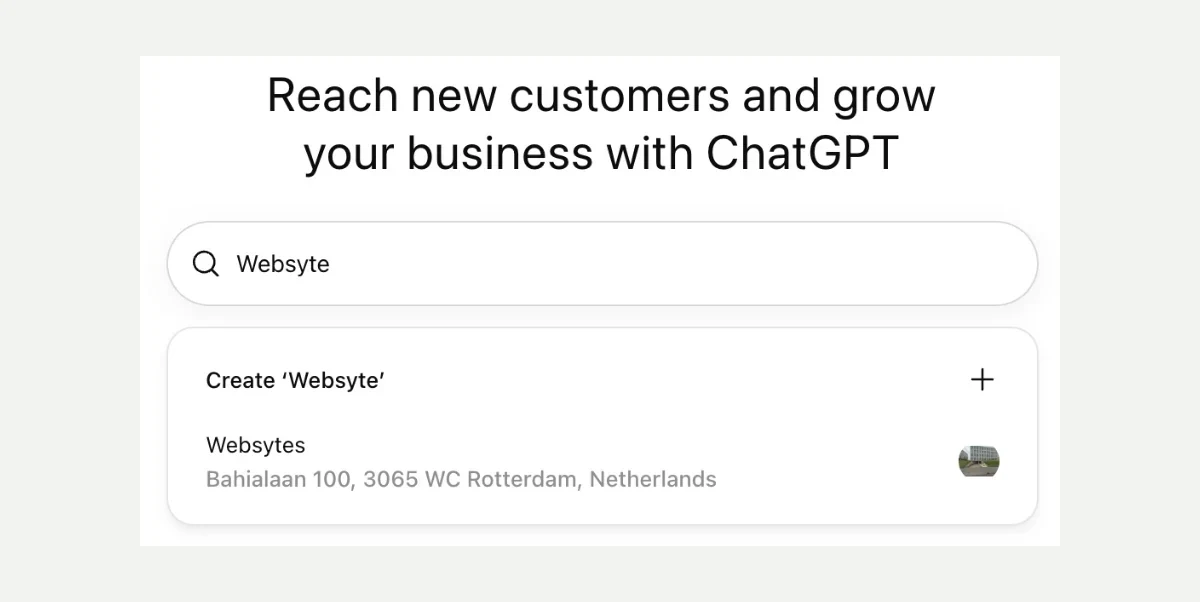
If your own business is already listed, pick that profile. You will then see a claim screen with Get started, followed by the same verification as below. Never pick the profile of a business that merely looks like yours.
3. Choose how customers interact with you
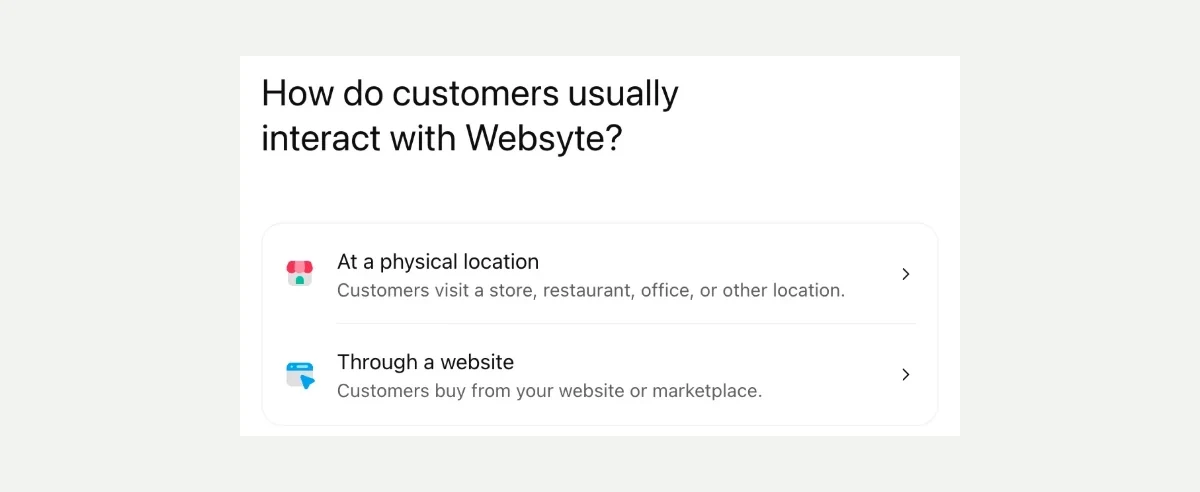
ChatGPT asks how customers reach your business: At a physical location (a store, restaurant, office or other location) or Through a website (customers buy from your website or a marketplace). If you mainly work through your website, choose the second.
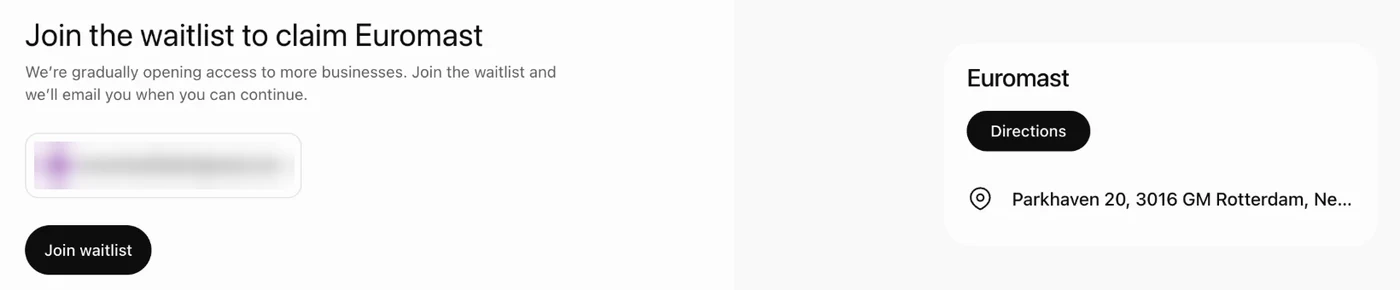
If you choose a physical location, you currently land on a waitlist. We saw this when we opened the profile of the Euromast in Rotterdam: ChatGPT only offered Join the waitlist.
4. Enter your website
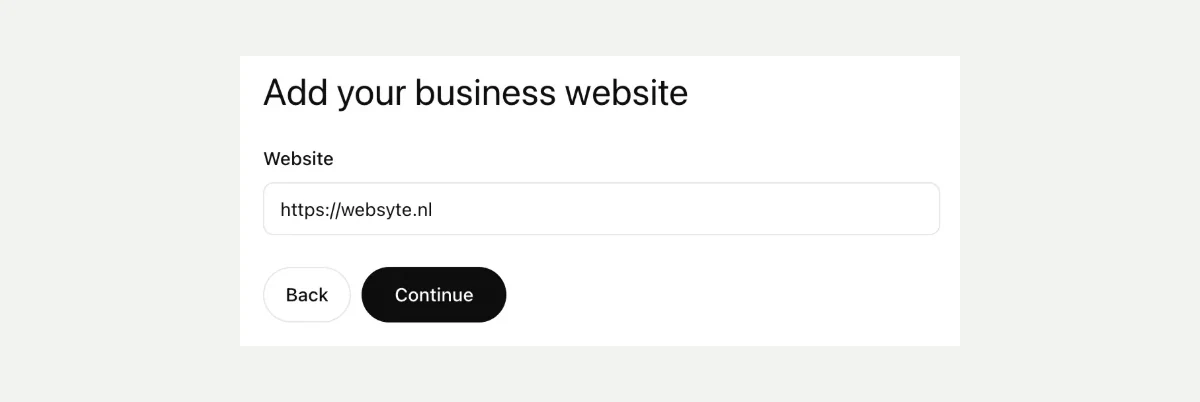
Enter your website address, starting with https. From here on, a preview of your profile on the right fills up with every step.
5. Prove the business is yours
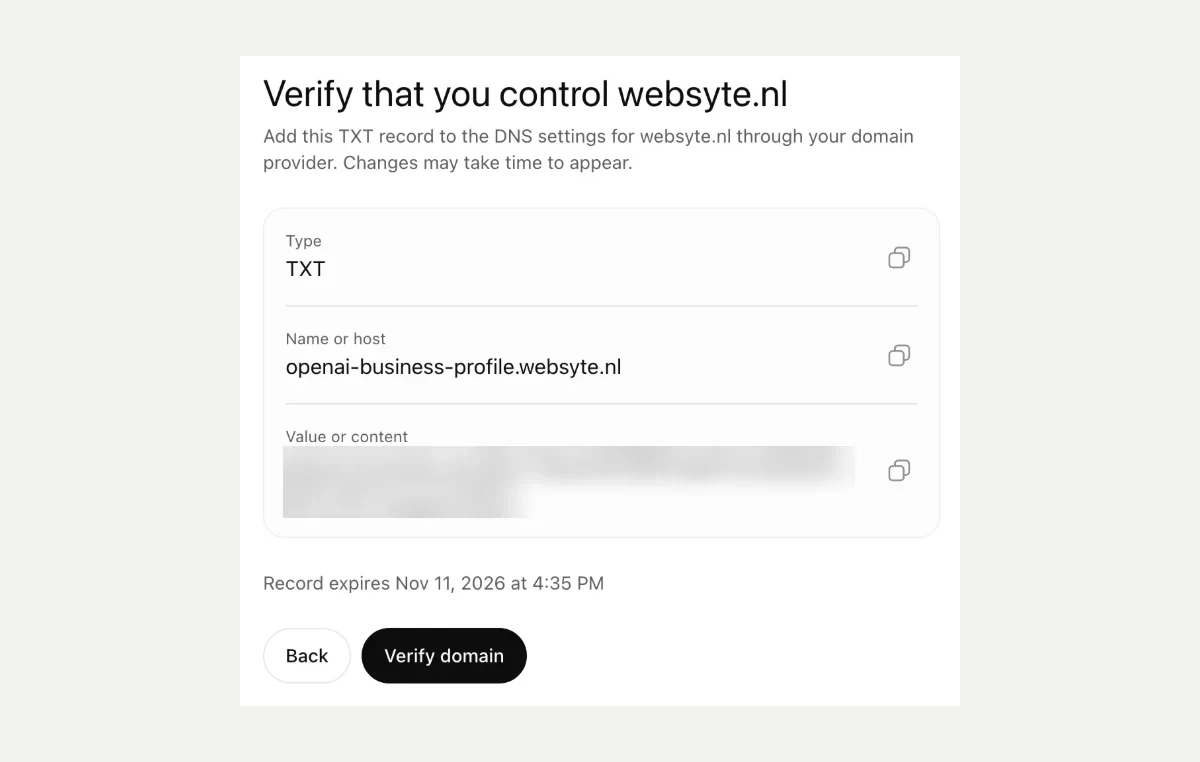
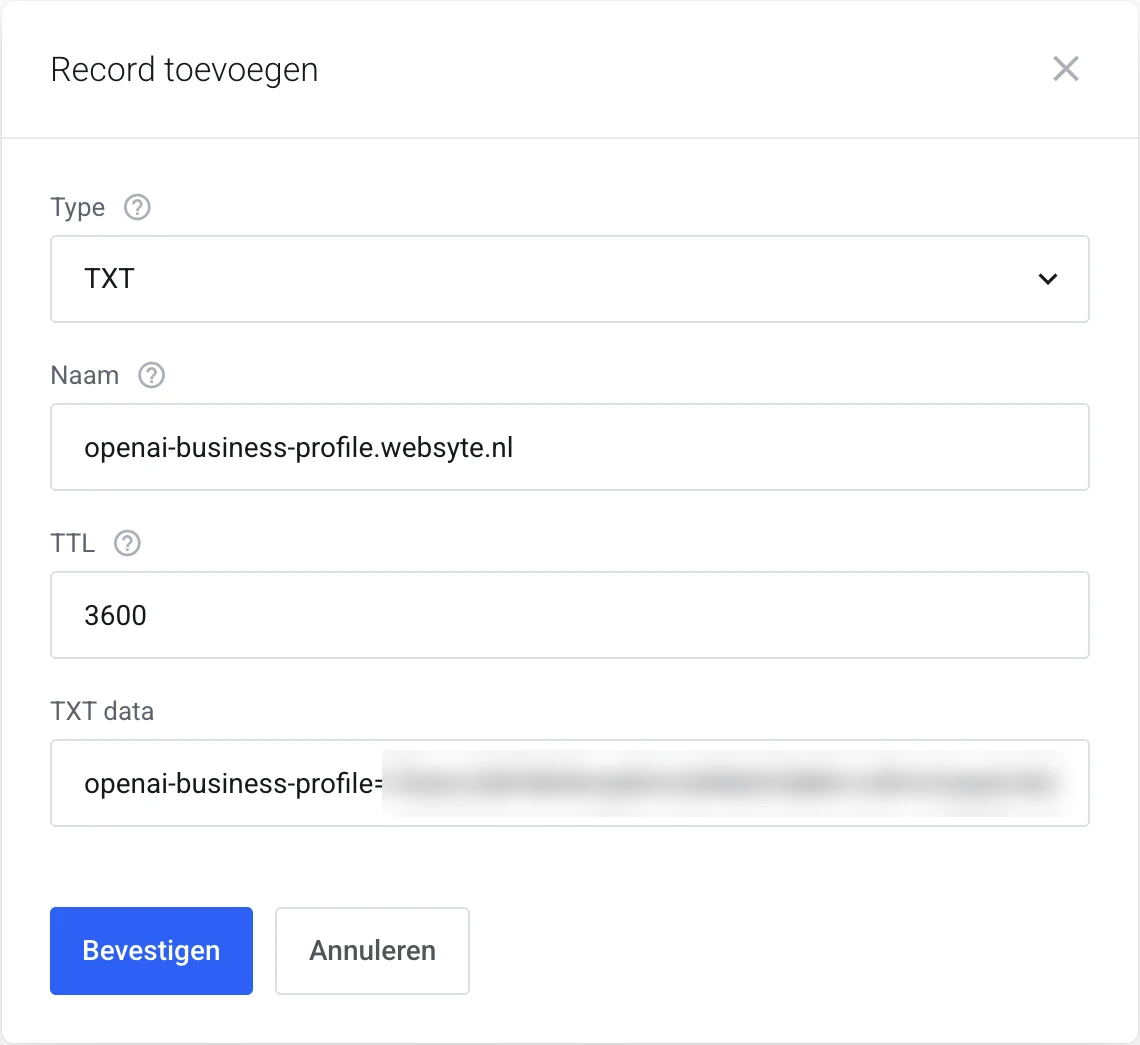
You prove that the website is yours with a TXT record in your DNS. For both businesses, this was the only method we were offered. ChatGPT shows three values: type, name and value. Copy them with the buttons next to them and add the record at your domain registrar or hosting provider. Then click Verify domain. The record expires (for us, the same afternoon), so do this in one go. If your web developer manages your domain, send them these three values.
OpenAI's help article also mentions verification by phone, business email or Shopify. Which method you get depends on your business and your country.
6. Tell people who you are
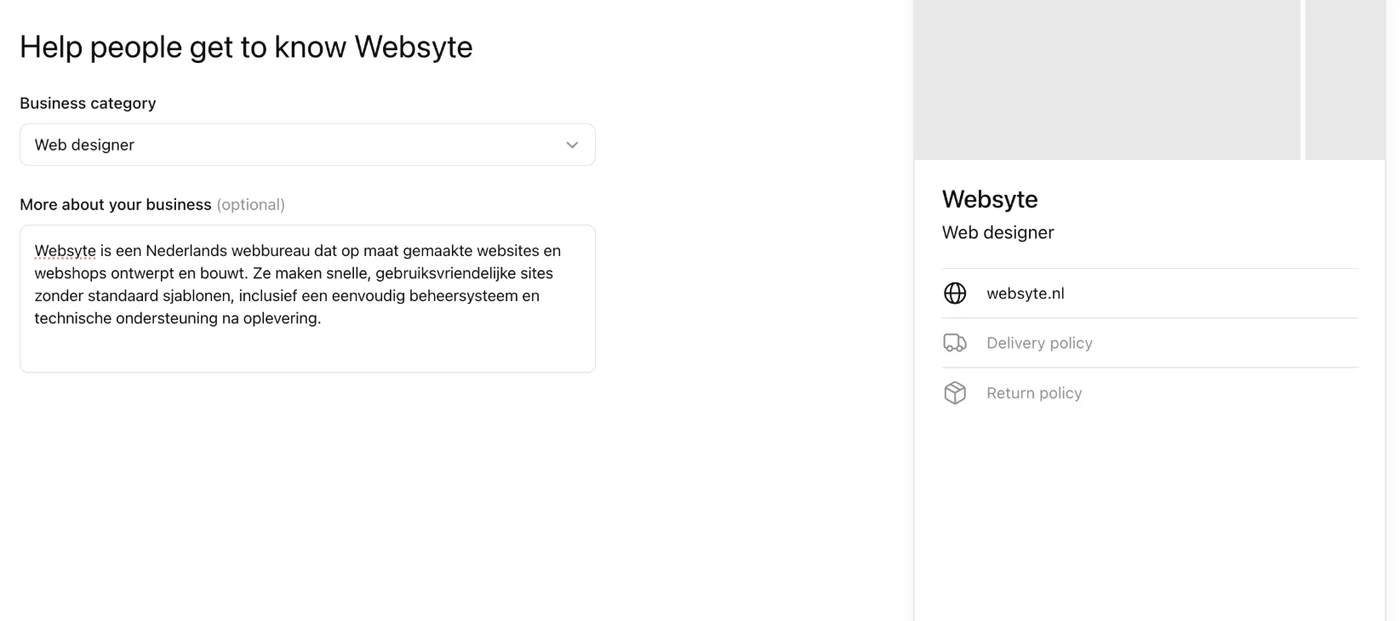
Choose a Business category and fill in More about your business: at most 300 characters on what you do, for whom and where. The preview on the right shows how it appears on your profile.
7. Add contact details, delivery and returns
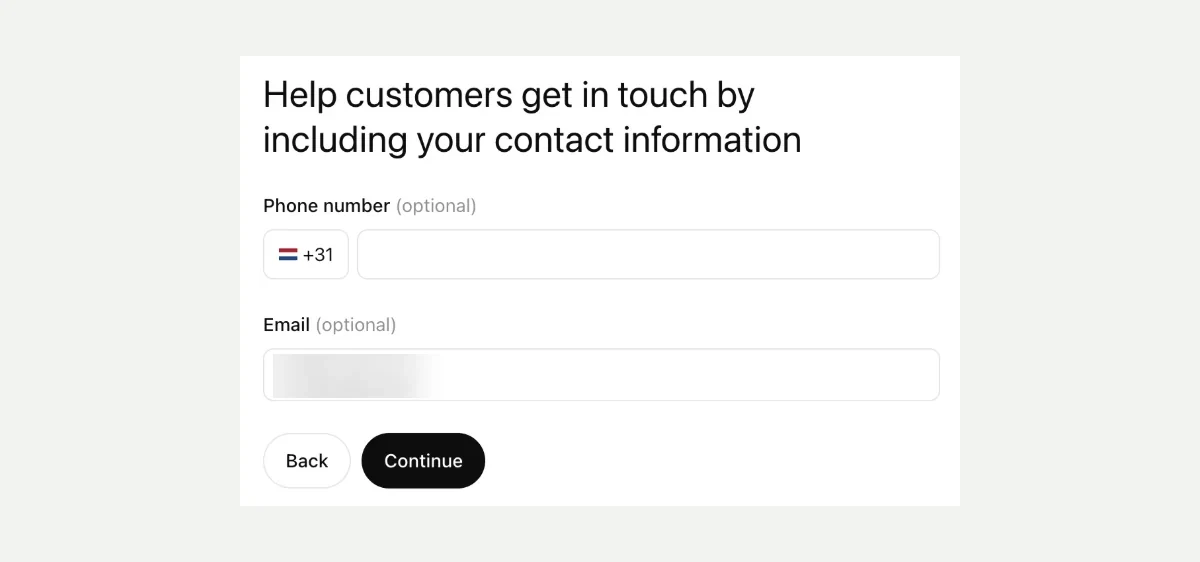
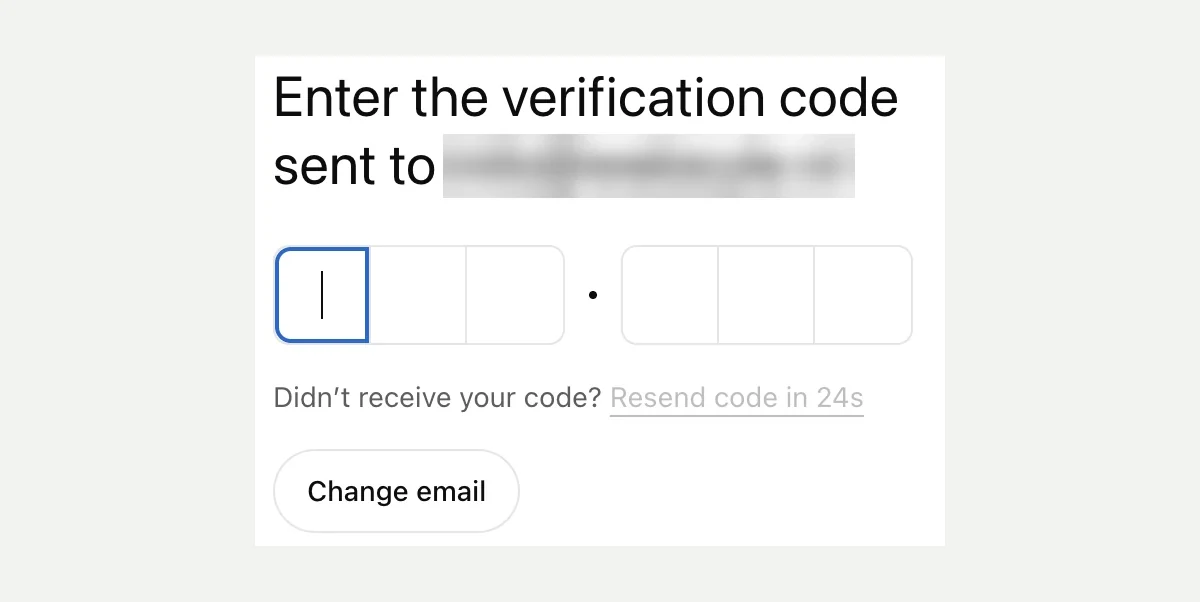
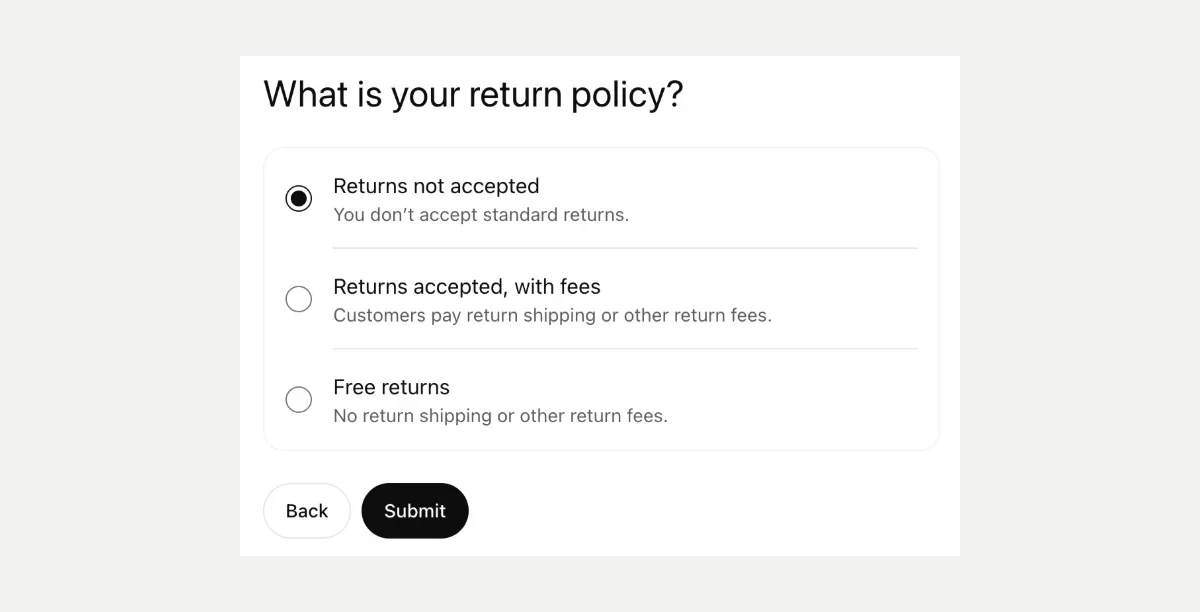
Phone and email are optional. If you enter an email address, ChatGPT sends a code to it to confirm that address. This only checks your contact address and is separate from the verification in step 5. Then choose your delivery policy (no delivery, paid or free) and your return policy (no returns, with fees or free). As a service business, choose "We don't offer delivery" and "Returns not accepted". Finish with Submit.
8. Your profile is saved as a draft
You get the message You've created [name]. The profile is saved as a draft and is not visible yet. On this screen ChatGPT also offers $500 in advertising credit for ChatGPT Ads and an upgrade to ChatGPT Business. Both are optional: your profile works without them.
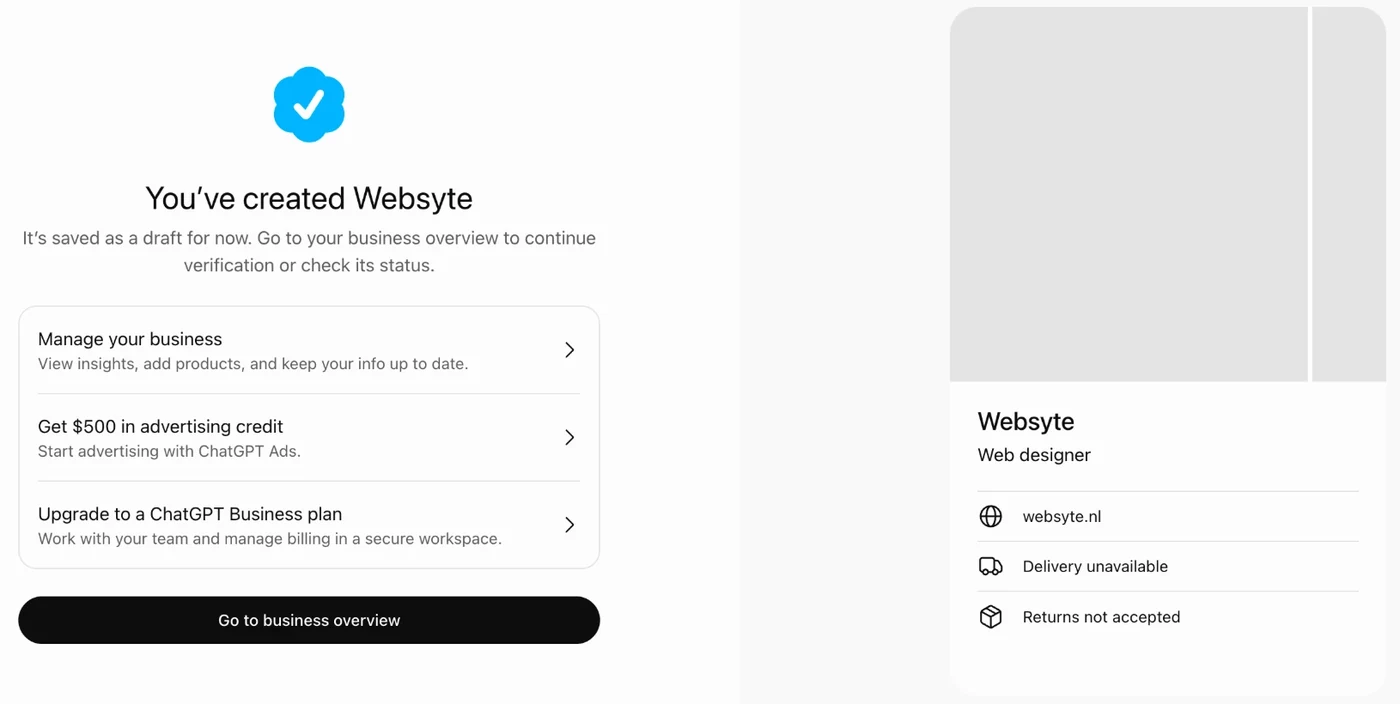
Your business overview now says Draft, with a notice at the top that you still need to verify your identity.
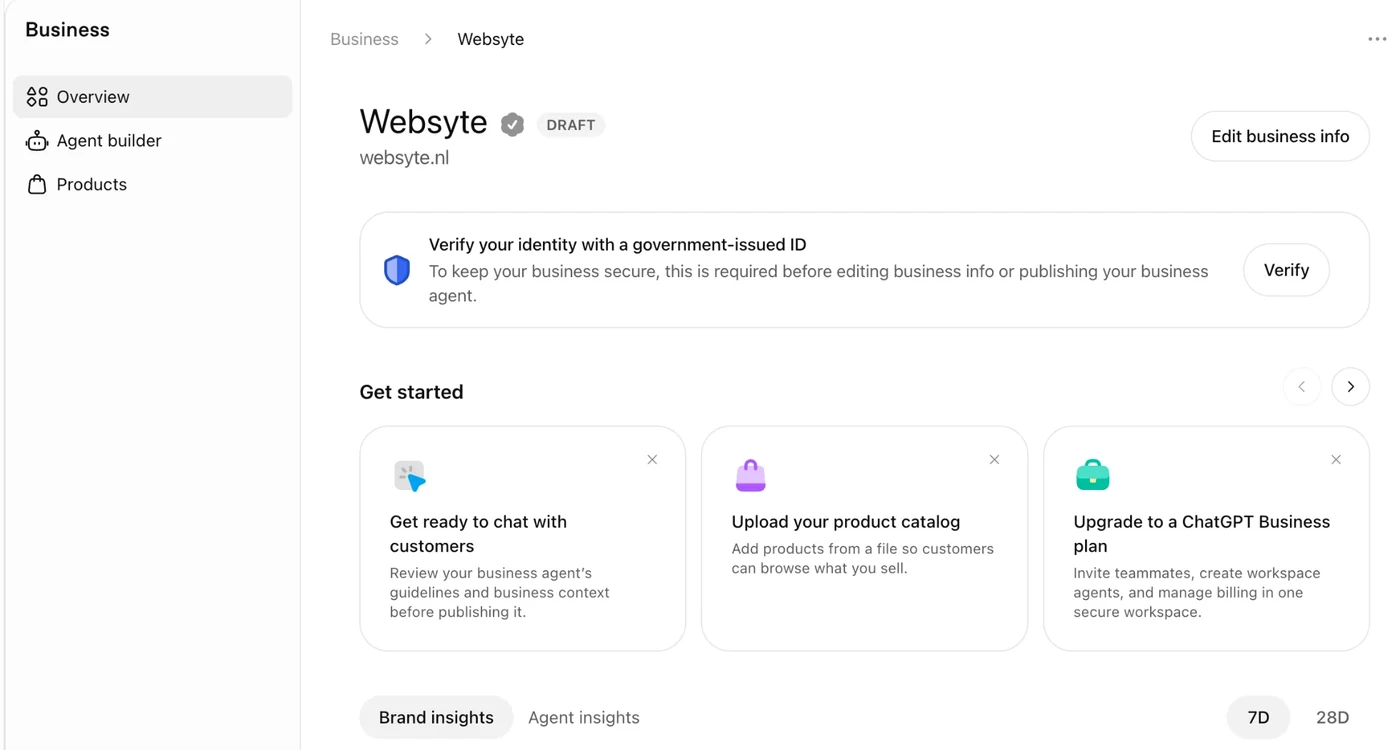
9. Verify your identity
Click Verify and then Start verification. OpenAI uses Persona for the check. You consent to the processing of your biometric information and keep your ID at hand. According to the screen, Persona keeps your account information for no more than 7 days and your biometric information for no more than 30 days. Make sure the business name, address and registration number match your official business records exactly, or the check fails.
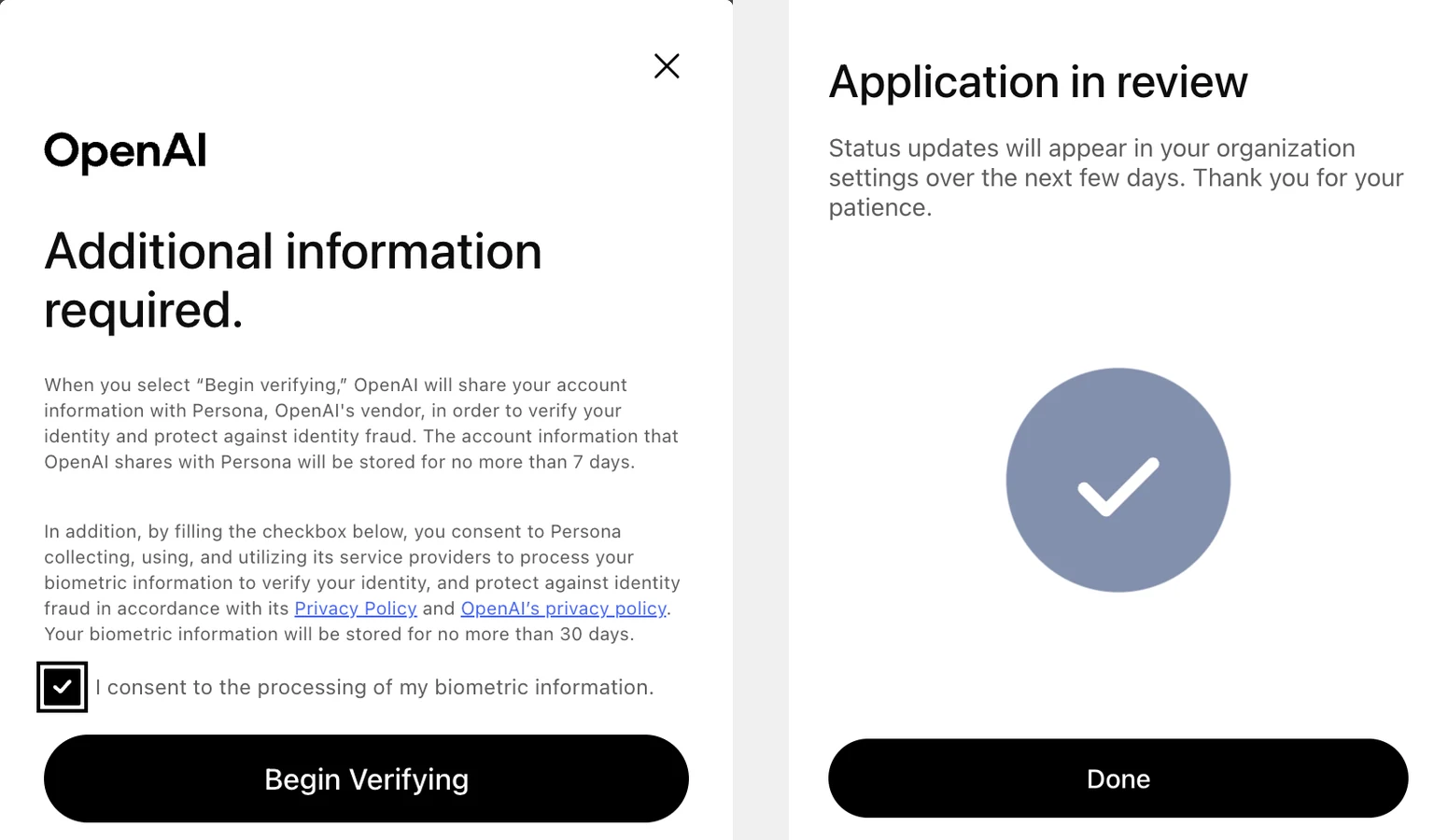
Your application is then in review. OpenAI says you will hear back within a few days. For AIGeschikt the check was done within an hour. Once approved, your profile gets the blue check and OpenAI publishes it straight away: there is no separate publishing step.
10. After approval
- Update your details. Use Edit business info to change anything later, and add a logo (300 × 300 px) and a cover photo (1200 × 400 px). OpenAI reviews every change. ChatGPT also keeps using other sources.
- Products. Online shops add a feed under Products: a CSV file, a link to a feed you host yourself, or your Shopify catalog. Shopping in ChatGPT is only live in the US for now, but with a feed ready you are in from day one when it opens in your country.
- Access to your website. The overview has a block that shows whether ChatGPT can access your website. If access is not confirmed, check your robots.txt. ChatGPT uses the crawler OAI-SearchBot to show websites in its search answers. Block it, and your site will not appear in ChatGPT answers that rely on search. GPTBot collects text for training models. You can block that one without affecting your visibility in search answers.
- Invite your team or agency. The admin who claimed the business can invite teammates and give an agency access from the top right of the overview. Everyone uses their own ChatGPT account. Never forward your personal claim invitation: that gives someone else the rights in your name.
What to write in "More about your business"
You have 300 characters, including spaces. You can type more, but the rest is cut off. ChatGPT uses this text to answer questions about your business, so write what a customer needs to know to choose you:
- What you do, in the words your customers use.
- For whom: consumers, businesses, a sector.
- Where: your service area or location.
- What sets you apart: a specialism, certification, guarantee or way of working you can prove.
OpenAI is strict about the content. Everything has to be accurate and current. Misleading claims about prices, availability, qualifications or results are not allowed, nor are fabricated reviews or guarantees you cannot keep. So do not write "the best in the country" if you cannot back it up. A concrete fact also works better than a slogan.
An example of 210 characters for a fictional installer:
Installer of heat pumps and solar panels in the Utrecht region. For homeowners and housing associations. Certified installer with InstallQ recognition, in-house engineers and a five-year installation guarantee.
What works in the Netherlands, and what does not yet
OpenAI writes that any eligible business can claim its profile "where ChatGPT is available", if verification is supported there. It does not list countries. This is what we saw ourselves in Business Hub on 11 November, with a Dutch account and a Dutch business:
| Feature | In the Netherlands | What we saw |
|---|---|---|
| Search and claim a business | Yes | Dutch businesses are already listed, with an address. Creating a new profile also works. |
| Edit details | Yes | Category, description, contact, photos, delivery and returns. OpenAI reviews every change. |
| Insights | Yes | Mentions, clicks and conversation topics, filled from day one. |
| Product feed | Partly | The Products menu is there. According to OpenAI, shopping with product feeds is only live for users in the US. |
| Business Agent | No | "Agent builder isn't available yet": OpenAI is rolling it out by region. |
| Physical locations (store, restaurant, office) | Not yet | You land on a waitlist. According to OpenAI, local stores and restaurants can currently only claim an existing US listing. |
| Ads in ChatGPT | Yes | ChatGPT Ads has run in the Netherlands since late August 2026. An ad that leads to a Business Agent is still a small test in the US. |
The rollout happens in phases, so what you see may differ by day and by type of business. If you get a waitlist instead of a claim button, your business falls in a category that is not open yet.
What exactly is Businesses in ChatGPT?
OpenAI calls the whole thing Businesses in ChatGPT. It has three parts:
- Business Hub: where you claim your business and manage your profile. You fill in your category, a short description, your contact details, logo and cover photo, and your delivery and return policies. Online shops can connect a product feed with prices and availability.
- Insights: per 28 days you see how often ChatGPT mentions your business, how often people click through to your website, and what topics the conversations you appear in are about. You never see individual questions or conversations.
- Business Agent: your own chatbot that answers questions about your products and policies, in a separate conversation next to ChatGPT's answer. For now it is only available to online shops and online service businesses in the US.
When ChatGPT mentions your business in an answer, people can click through to your profile in ChatGPT. It shows your details and, once verified, a blue check that tells people the business itself manages the profile.
OpenAI adds two things you should know. Claiming "does not guarantee higher placement or sales": ChatGPT still decides who it recommends. And ads do not influence those independent answers. The profile is about accurate information, not a better position.
Is this the same as ChatGPT Business?
No. ChatGPT Business is the paid plan in which a team works together in one workspace. You pay per user per month, from two users. It used to be called ChatGPT Team.
Businesses in ChatGPT and Business Hub are about how your business appears to others in ChatGPT. You do not need a paid plan for that. We went through the whole process with a free ChatGPT account. According to OpenAI, you also do not need an ads account or an Enterprise contract. Business Hub does show a tile to upgrade to ChatGPT Business. That is an offer, not a requirement.
Who is it worth it for?
For almost any business with a website: it takes fifteen minutes, it is free, and it stops someone else from claiming your profile. You get the most out of it if:
- ChatGPT already mentions you. Then you want the details behind that mention to be right, and you finally see how often it happens.
- you sell products that are also sold through resellers. A profile with your own details, and later your own product feed, gives ChatGPT a reason to point to you instead of a reseller.
- you are a service business with a clear region or specialism. The 300-character description is where you say in one go what you do, for whom and where.
There is less urgency if you run a local store or restaurant without an online shop. Those cannot claim yet in the Netherlands.
What do the insights show?
After verification, your profile opens on the insights tab. It has three blocks:
- Mentions and clicks: per day, over 7 or 28 days, with the change compared with the previous period.
- Access to your website: whether ChatGPT can read your site. More on this in step 10.
- The 5 most mentioned conversation topics: broad themes, with the number of mentions per theme.
For us, the insights were already filled while the claim was still in review. What stands out straight away: the number of clicks is a very small share of the number of mentions. That fits how ChatGPT works. The answer is already in the conversation, so few people click through. If you want to be chosen in ChatGPT, you need to be in that answer, with the right information. Drawing visitors comes second. OpenAI itself notes that a click does not confirm a visit or a purchase.
Most of our conversation topics were about comparing providers. That is exactly the moment someone chooses. The topics are broad categories, not individual questions, so they do not show which question you win.
Why the counter is lower than how often you are mentioned
For an online business, OpenAI only counts a mention "when ChatGPT references the business's website". Your brand name in the text does not count. Our own measurement shows how much that matters.
Every week we ask the ChatGPT app the same buying questions, from the Netherlands and without an account. From 12 October to 9 November 2026 that produced 8,124 answers to 998 questions for ten Dutch businesses, from security and fire-retardant treatment to valuation, tools and sporting goods.
| What we measured in ChatGPT | Result |
|---|---|
| Answers in which ChatGPT names at least one business or brand | 80.1% |
| Average number of names, when names appear | 4.2 |
| Answers with three or more names | 63.1% |
| Answers with at least one source | 77.9% |
| Average number of source domains per answer | 2.6 |
| Named businesses whose own website is among the sources | about 34% |
The last row is an approximation: we checked whether the named business appeared in the domain of one of the sources. An example from our measurement: ChatGPT names a large alarm company, but takes its information from comparison and consumer information sites and from the Dutch competition authority. The company is in the answer, but does not count as a mention in Business Hub.
What this means for you:
- The counter in Business Hub is a lower bound. You are probably mentioned more often than you see there.
- Your own website as a source is a separate goal. If you want ChatGPT to cite your page, that page has to answer the question better than the comparison site it uses now.
- Also look at what is written about you on other sites. Two out of three times ChatGPT names a business, the information comes from someone else.
Frequently asked questions
Does it cost money to claim your business in ChatGPT?
No. Claiming, managing your profile and viewing the insights are free. At launch, OpenAI left open whether costs will come later, for example for the Business Agent. Advertising in ChatGPT is paid, but separate from your profile. After we created a profile, ChatGPT offered us $500 in advertising credit. That is optional.
Do I need a paid ChatGPT plan?
No. We claimed our business with a free account. You also do not need an ads account or ChatGPT Enterprise.
Will I rank higher in ChatGPT if I claim my business?
No, according to OpenAI. ChatGPT keeps making its own recommendations and comparisons. What you gain: accurate details, a blue check, your own product information and insight into how often you are mentioned. You move up with pages that answer your customers' questions better than the sources ChatGPT picks now.
What if someone else has already claimed my business?
Open the profile, click the menu with the three dots and choose Dispute ownership. You then prove through Persona that you represent the business.
Can my web developer or marketing agency do it for me?
It is best to do the verification yourself, because the identity check is in the name of the person who represents the business. After that, you can give your agency access to manage the profile. Your web developer can help with the DNS record.
How long does approval take?
It varies. OpenAI says you will hear back within a few days. For AIGeschikt the identity check was approved within an hour, and the insights were already visible while the claim was still in review.
Why is my mentions counter empty?
OpenAI only shows numbers above a minimum number of conversations. According to OpenAI, an empty counter does not mean you were mentioned zero times. The data may also still be being collected.
Can I delete my profile again?
Only a draft that has not been published. OpenAI Support cannot delete or hide a published profile. You can keep it up to date, which is usually better than a profile nobody manages.
Conclusion
Claim your business in ChatGPT if you have a website: it is free, it takes fifteen minutes, and you are the only one allowed to do it. It does not move you up in the answers, but it makes sure ChatGPT has the right details about you and shows, for the first time, how often you are mentioned. Read that counter carefully: it only counts the times your own website is used as a source, and in our measurement that is only a third of the times a business is named. If you want to be chosen more often, work on two things: a profile that is accurate, and pages that answer customers' buying questions better than the sites ChatGPT cites now. Why being named and being cited are two different things is explained in What GEO actually means, and how we measure it.
Where we stand
AIGeschikt is a Dutch GEO tool from Rotterdam that measures every week whether ChatGPT, Gemini, Perplexity, Claude and Google AI Overviews mention your business, and does the work on your own website, from €299 per month excluding VAT. The figures on ChatGPT answers in this article come from that weekly measurement. Plans and prices are on our pricing page. The Dutch version of this guide is Bedrijf claimen in ChatGPT: stappenplan voor Business Hub.
Sources
12 sources- 1
OpenAI, Introducing Businesses in ChatGPT: openai.com (10 November 2026)
- 2
OpenAI, Businesses in ChatGPT, with FAQ: openai.com/business/businesses-in-chatgpt
- 3
OpenAI Help Center, Setting up your business on ChatGPT: help.openai.com/articles/20001635 (updated 10 November 2026)
- 4
OpenAI, Businesses in ChatGPT policy: openai.com/policies/businesses-in-chatgpt (10 November 2026)
- 5
OpenAI, Business Agents Policy: openai.com/policies/business-agents-policy (10 November 2026)
- 6
OpenAI, Overview of OpenAI Crawlers: developers.openai.com/api/docs/bots
- 7
OpenAI, ChatGPT for merchants: chatgpt.com/merchants
- 8
TechCrunch, OpenAI rolls out new business profiles: techcrunch.com (10 November 2026)
Show all 12 sources
- 9
VentureBeat, OpenAI lets you claim your business in ChatGPT: venturebeat.com (10 November 2026)
- 10
Euronews, ChatGPT to start showing ads across Europe: euronews.com (21 August 2026)
- 11Own measurement
AIGeschikt's Business Hub
own screenshots, taken on 11 November 2026.
- 12Own measurement
AIGeschikt measurement, 12 October to 9 November 2026
8,124 answers from the ChatGPT app to 998 fixed Dutch buying questions for ten Dutch businesses.